For contributor pipelines

Where studios and creators ship great work, together.

Replace Discord threads, scattered Drive folders, and lost feedback with one place to receive, review, and approve creative submissions from your contributors.

Built for game studios, animation teams, and agencies running contributor pipelines.
Submitting work to a studio? Sign in as a contributor →
No credit card required|14-day free trial|Preview 20+ formats inline|Cancel anytime
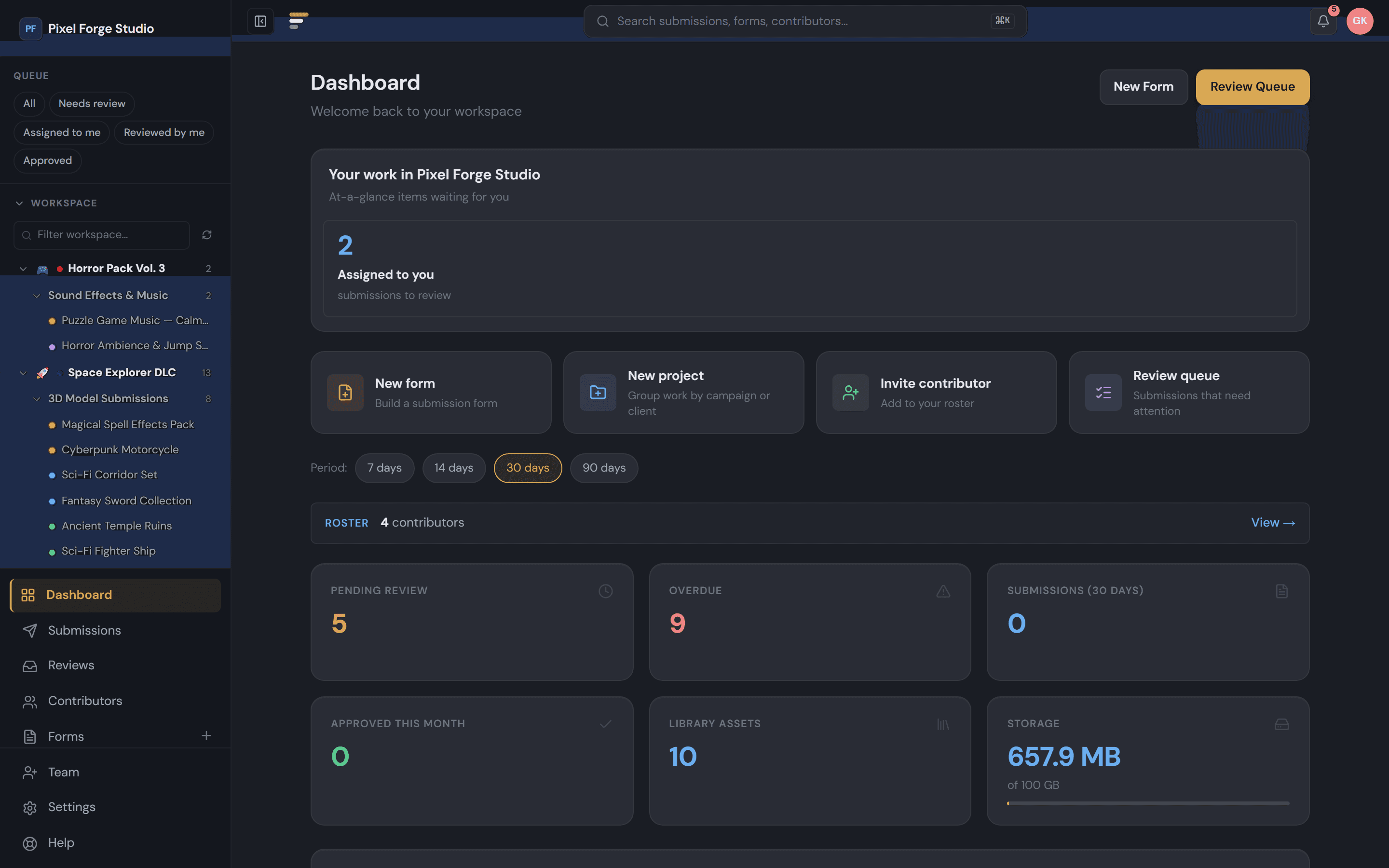
Staxio — Dashboard

Review precisely

Frame-accurate comments, inline file previews, version compare with diff — the whole loop without leaving the page.

Approve confidently

Multi-step approval chains that include externals. Every sign-off attributed, every revision tracked end-to-end.

Ship faster

Library, roster, and integrations wired up. Approved work flows into the studio without anyone re-uploading anything.

20+ Format Previews
3D, PSD, ZIP, code, audio inline. No downloads to review.
Approval Chains
Multi-step sign-off with contributors.
Submission Versioning
v1 ↔ v2 side-by-side compare with inline diff.
Pin-point Comments
Anchor feedback to a region, page, timestamp, or 3D mesh — click to jump back.
Review everything inline20+ preview formats3D models in the browserZIP inspectorCode, JSON & CSVPin-point commentsNo downloads
20+
file formats previewed inline — no downloads to review
N-version
side-by-side compare with inline diff on every resubmit
5 min
from form-create to live-link — pipeline up in your first session
Your toolchain, natively

Your file types, inline.

No downloads, no conversion. Open it, look at it, decide.

Your art director shouldn't need Photoshop, Blender, or Blockbench installed to approve a file. Reviewers open the link — the model spins, the PSD flattens, the audio plays — right in the browser. No installs, no waiting on a 2 GB download to land before someone can say yes.

Blockbench
.bbmodel
Maya · Blender · DCC
.fbx.obj.glb.gltf.stl
Photoshop
.psd.psb
Minecraft packs
.mcpack.mcworld.jar
Archives
.zip
Images
.png.jpg.webp.svg
Docs & code
.md.json.csv.pdf
Audio & video
.mp3.wav.mp4
Fonts
.ttf.otf.woff
Full list in the FAQ.

Your contributor pipeline is held together with duct tape.

Most studios manage contributors across four or five tools — none of them designed for the job. Here's the contrast.

Before Staxio
💬
Scattered DMs
Submissions lost in Discord, Slack, and email threads nobody can search.
📂
Shared Folder Chaos
Duplicate files, wrong versions, no approval history — ever.
👁
No Visibility
No one can see what's pending, who reviewed what, or where the pipeline stands.
With Staxio
Every comment lives with the file
Feedback ties to the exact submission and version — searchable, attributed, and never buried in a channel scroll.
Versioned + side-by-side compare
v1, v2, v3 with snapshotted feedback. Open any two versions side by side — swipe-divider on images, real line-diffs on text + JSON, description changes called out automatically.
Real-time pipeline view
Dashboard shows what's pending, in review, and approved — with who did what and when. Approval trail you can audit.

From upload to library in 4 steps.

From contributor onboarded to asset approved — the whole pipeline, end to end.

1
Set Up Your Pipeline
Spin up your first form in seconds — start from a template (Character Brief, SFX, Animation Cycle…) or save your studio's standard form as a reusable template. Custom fields, file rules, deadlines, all configurable.
2
Onboard Your Contributors
Share a public link or invite contributors directly. They can submit without an account — or sign up for a portal to track everything.
3
Review & Decide
Your team reviews submissions inline, leaves feedback, and approves or requests changes — with 20+ file formats previewed without downloads.
4
Build Your Asset Library
Approved work flows into a searchable, tagged library your whole team can access, download from, and version.

See it in action — start your free trial and have your first pipeline live in under 5 minutes.

PLATFORM FEATURES

See why teams switch to Staxio

AllPendingIn ReviewApproved
8 submissions
png
character_sprite_v2.png
AD
Alex D. · 3D Model Submissions
highPending
psd
background_forest.psd
MA
Maria A. · Environment Pack
mediumIn Review
zip
ui_icons_pack.zip
SF
Studio FX · UI Asset Drop
lowApproved
fbx
sword_rigged_v3.fbx
PP
Priya P. · 3D Model Submissions
highRevision
character_sprite_v2.png selected
Compare anything

See exactly what changed.

Drag a swipe divider across paired versions, flip on pixel-diff to spot the smallest moved pixel, or compare PDFs page-by-page — every common creative format runs through the same compare engine.


Pixel ForgeCyberpunk Key Art·key_art_hero.psdv1 ↔ v2
Side-by-sideSwipeOverlayDiff
v1 — conceptv2 — final
v1 — concept
v2 — final art
Drag to compare
1920×1080PSD · 12 layers4.2 MB
Threshold 0.100.32% changed
Pixel-perfect diff mask
PDFs page-by-page
PSDs side-by-side
Same engine, every format
PNGJPGWebPPDFPSDPSBMDJSONCSV+ 12 more
POINT-AND-COMMENT REVIEW

Comment exactly where it matters.

Drop a pin on an image, drag a region on a PDF, tap a moment in a clip, or click a mesh in 3D — every comment carries its anchor home. Click it later and the viewer jumps right back, frame-perfect.

Pixel Forge / Hero key-art · v3
AnchorCompareDetails
Discussion3 threads · 3 anchored
Pins cycle automatically. Click any pin or thread to lock the highlight.
Image pins + regionsPDF page+regionVideo / audio timestamps3D pins · with camera restore

Built for how contributor pipelines actually run

Every tool you need between brief and approved — and none you don't.

Capture & Review
The core flow — get work in, decide on it, talk about it.
20+ formats, zero downloads
Spin 3D models (glTF, OBJ, FBX, STL, PLY, Collada, USDZ, 3MF, Rhino 3DM, Blockbench + more), peek inside ZIPs, diff code and JSON, preview PSDs, scrub audio with waveforms — all inline. Your team stops context-switching to Discord to look at a file.
.zip
.psd
.glb
.fbx
Custom Submission Forms
Drag-and-drop form builder with text, dropdown, URL, and checkbox fields. Set file type and size rules per form.
Review Workflow
Approve, reject, or request revisions with one click. Internal notes stay private; feedback reaches contributors.
Pin-point Comments
Anchor feedback to the exact spot
Click an image, drag a region on a PDF, tap a moment in a clip, or click a mesh in 3D — every comment carries its anchor. Replies thread under the root, resolve to close the chain, and click any comment to jump back to the exact view it was made on.
Form Invitations
Invite specific contributors to submit directly from a form. Track who was invited, who has submitted, and send branded invitation emails in one click.
Iterate & Approve
Sign-off chains, version history, no lost feedback.
Versioning + Side-by-side compare
Compare any two versions side by side — drag a swipe divider over images, see real line-diffs on text + JSON, watch how the description evolved across revisions. Every resubmit becomes a new version (v1, v2, v3) with files, description, and the feedback all snapshot. Old files never disappear. Pro+ unlocks compare across 3+ versions and exporting the report as a PDF.
v1
v2
Comparev1v2 · current
Multi-step Approval Workflows
For studios where one reviewer isn’t enough. Configure chains like Art Director → Creative Director → Producer per form. Assign by role or by named people, with optional N-of-M thresholds. Direct approval is blocked until every step signs off. Pro+.
Form Templates
Save your own — approval chains and all
Skip the blank-page problem. Pick from a curated catalog (Character Brief, Prop Sheet, SFX, Animation Cycle, VO, UI…) — or save any form your studio builds as a reusable template. Saved templates carry over fields, file rules, branding, even the multi-step approval chain. Cloning is one click.
Revision Loop with Context
Request a revision and the contributor sees your feedback inline with their resubmit form. Each new version remembers exactly which feedback it was responding to — so reviewing v3 isn’t guesswork.
Activity Timeline
Every status change, every comment, every @mention, every approval step — in one chronological feed. With per-org retention controls and a dedicated Audit Log for admin actions.
Organize & Scale
Where the work lives once it’s in.
Asset Library
Approved submissions auto-populate a searchable, tagged library with version tracking and download history. Filter by project, tag, format, or contributor — and export anything.
Contributor Portal
Contributors get their own portal to track submissions, view feedback, and resubmit files. One login works across every studio they contribute to — no account sprawl.
Projects
Group forms, submissions, and assets by campaign, client, or game. Filter your entire workspace to a project in one click. Completely optional.
Contributor Roster
Build a durable list of regular contributors. Forms you assign to roster contributors show up in their dashboard automatically — no shared links, no re-explaining the workflow. Public link still works for one-off submissions.
Team Roles & Permissions
Granular permissions across 7 categories — forms, submissions, library, team, contributors, settings, and reports. Custom roles fully supported.
Automate & Stay on Track
Fewer clicks, fewer dropped balls.
Webhooks & Integrations
Native Discord and Slack integrations send rich notifications to your channels the moment a submission is received or reviewed. Or push HMAC-signed webhook events to any HTTP endpoint for custom automation.
New submission· just now
Discord
Slack
Webhook
Keyboard Shortcuts
Power through your review queue: A to approve, R to reject, V for revision, J/K to navigate submissions.
Analytics & Reports
Dashboard stats, submission trends, form performance, and CSV export. Know your approval rate at a glance.
Deadlines & Reminders
Set deadlines on forms and individual revision requests. Overdue states surface on your dashboard and queue, with optional auto-close when a deadline lapses.
Daily Digest
One 8 AM summary of overdue items, upcoming deadlines, pending reviews, and fresh comments — for studio and contributor alike. Empty days are skipped so it never feels like noise.
The Staxio Difference
faster

Studios on Staxio move submissions from intake to approved roughly five times faster than the Discord-and-Drive workflow it replaces.

— Internal benchmark vs. legacy multi-tool stack, 2026
For contributors, too

Your creators get a portal they’ll actually use.

The fastest way to lose a good contributor is to make them suffer through bad tools. Staxio gives the people submitting work a real workspace — one login across every studio they work with, feedback delivered in context, deadlines they can see, and a portfolio that builds itself.

Sign in as a contributor
One login, every studio
Contributors sign in once and see every studio they work with in one place — no account sprawl, no juggling passwords.
Feedback that loops back
Two-way comments, revision requests, and approvals arrive in their portal — not buried in a Discord channel.
Deadlines they can see
Due dates, revision windows, and automated reminders keep contributors ahead — without anyone having to chase.
The current stack

You're already paying for this — in time.

Most studios cobble together five tools to do what Staxio does in one. Here's what that actually looks like.

Your current stack
1
Notion · Asana
for tracking who is doing what
2
Discord · Slack
for collecting submissions
3
Google Drive · Dropbox
for storing the files
4
Email + DMs
for chasing approvals
5
A spreadsheet somewhere
for the contributor list
Five logins. Five places to look. Nothing talks to anything else.
One platform
With Staxio
Public submission forms
collect work without account friction
20+ format inline preview
review in browser, no downloads
Approval chain with externals
sign-offs that include people outside your studio
Roster + direct assignment
your recurring contributors, organized
Audit log + version history
every action and revision tracked
One login. One source of truth. Built for the external part of the pipeline.

Same five jobs. One platform. Built specifically for the external part of your pipeline.

What teams are saying

See what teams say after making the switch.

★★★★★

We went from losing files in Discord to having a full asset library in a week. The review workflow is exactly what we needed.

JM
Jordan M.
Lead Producer, Indie Game Studio
★★★★★

The review workflow alone saved us 10 hours a week. The asset library is a bonus. Our contributors love how simple the submission form is.

RT
Rachel T.
Content Manager, Esports Organization
★★★★★

Contributors love the simple submission form. We love the approval dashboard. It replaced three separate tools for us overnight.

SK
Sam K.
Creative Director, Design Agency

Simple, transparent pricing

14-day free trial on every plan. No credit card required.

MonthlyAnnual2 months free
For solo studios
Starter
$25/mo
+ VAT where applicable
Billed $299/year·Save $49/yr
  • 5 workspace seats
  • Unlimited public-link submissions
  • 5 forms
  • 100 submissions / month
  • 1 project
  • 10 GB storage
  • Review workflow
  • Submission versioning + side-by-side compare
  • Form templates (built-in + save your own)
  • Pin-point comments (image / PDF / video / 3D anchors)
  • Contributor portal
  • Projects
  • Inline previews for 20+ formats
  • 1 Discord or Slack integration
Start Free Trial
Most Popular
For growing teams
Pro
$74/mo
+ VAT where applicable
Billed $888/year·Save $180/yr
  • 25 workspace seats
  • Unlimited public-link submissions
  • Unlimited forms
  • Unlimited submissions / month
  • Unlimited projects
  • Custom roles + permissions
  • 100 GB storage
  • Review workflow
  • Submission versioning + side-by-side compare
  • N-version compare + PDF diff export
  • Form templates (built-in + save your own)
  • Multi-step approval workflows
  • Pin-point comments (image / PDF / video / 3D anchors)
  • Contributor portal
  • Projects
  • Inline previews for 20+ formats
  • Asset library
  • CSV export
  • Unlimited Discord & Slack integrations
  • HMAC-signed webhooks
Start Free Trial →
For established studios
Studio
$166/mo
+ VAT where applicable
Billed $1992/year·Save $396/yr
  • 50 workspace seats
  • Unlimited public-link submissions
  • Unlimited forms
  • Unlimited submissions / month
  • Unlimited projects
  • Custom roles + permissions
  • 1 TB storage
  • Review workflow
  • Submission versioning + side-by-side compare
  • N-version compare + PDF diff export
  • Form templates (built-in + save your own)
  • Multi-step approval workflows
  • Pin-point comments (image / PDF / video / 3D anchors)
  • Contributor portal
  • Projects
  • Inline previews for 20+ formats
  • Asset library
  • CSV export
  • Unlimited Discord & Slack integrations
  • HMAC-signed webhooks
  • Custom branding
  • Embed forms on your own website
  • Priority support
Start Free Trial
14-day free trial · no credit card|Cancel anytime|14-day refund on annual plans

Monthly plans cancel at the end of your current cycle — no proration, no refund on the unused portion. Annual plans are fully refundable within 14 days of any charge. See full policy.

Compare all features across plans →

Need a custom plan, higher limits, or have questions? Talk to sales →

Frequently asked questions

Jump to the section that matters to you.

Getting started

Stop losing contributor work in DMs.

14-day free trial. No credit card required. Your first pipeline is live in 5 minutes.

Start Free Trial →